You have 473 voice memos in Apple’s Voice Memos app. Another 200 in WhatsApp. Some in Telegram. A few dozen in that random recording app you downloaded two years ago.
They’re all trapped. Each app is a silo, hoarding your audio memories. And Apple? Their voice memos live in a system folder so deep, you need a computer science degree to find them.
The Prison System
Here’s where your recordings are actually stuck:
Apple Voice Memos: Buried in ~/Library/Group Containers/group.com.apple.VoiceMemos/Recordings/ with names like 20231015_143022.m4a
WhatsApp Voice Notes: Trapped in the app, exportable one at a time
Telegram Voice Messages: Same prison, different walls
That Random App: Who knows where. Probably deleted when you ran out of storage.
The Export Dance of Death
Want to move your Apple Voice Memos elsewhere? Here’s the official way:
- Open Voice Memos
- Select a recording (one at a time)
- Tap Share
- Choose where to send it
- Repeat 472 more times
- Lose your mind
- Give up
Bulk export? Not a chance. Preserve original names? Forget it. Maintain metadata? Dream on.
Enter Sound Library: The Liberation Protocol
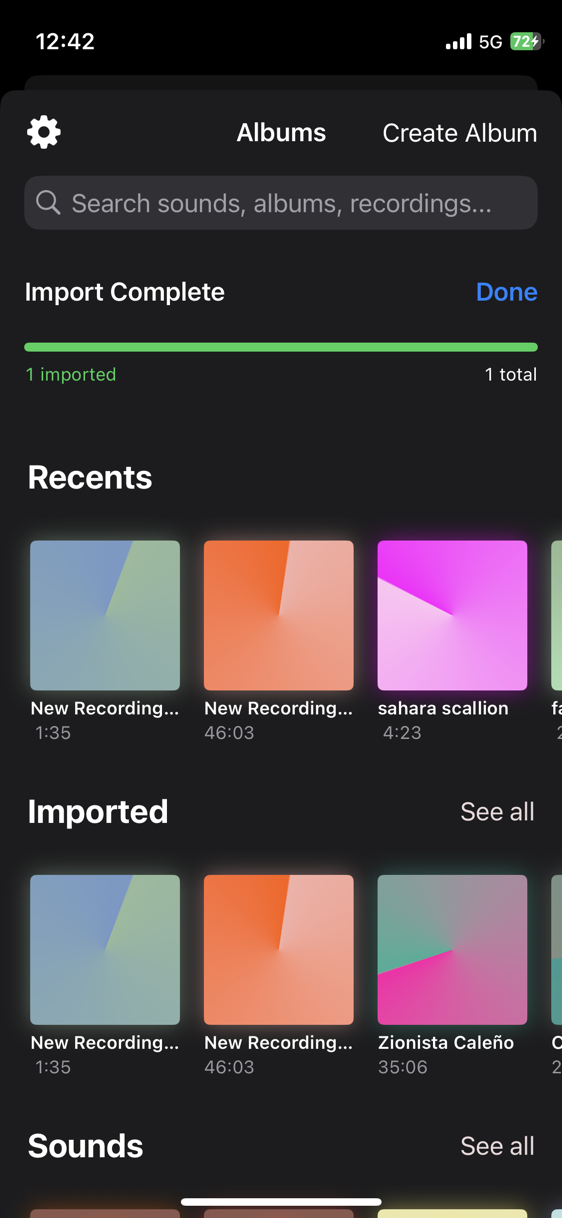
We built a Share Extension that appears everywhere audio exists. In any app that can share audio files, you’ll see “Import to Sound Library” right there in the share sheet.
One-Tap Migration
From Apple Voice Memos:
- Select multiple recordings (yes, multiple!)
- Tap Share
- Choose “Import to Sound Library”
- Done. All of them. With original names preserved.
From WhatsApp:
- Long press any voice note → Share → Import to Sound Library
From Files App:
- Select audio files → Share → Import to Sound Library
From Email Attachments:
- Tap the audio file → Share → Import to Sound Library
The Magic: Original Names Preserved
Apple Voice Memos shows “My Recording” but saves it as 20231015_143022.m4a. We grab the display name—the one you actually recognize—and preserve it forever.
That “Interview with Sarah” recording? It arrives in Sound Library as “Interview with Sarah,” not as cryptic timestamp garbage.
Intelligent Duplicate Detection
Accidentally import the same file twice? Three times? We catch it.
Using SHA-256 hashing, Sound Library identifies duplicate audio files regardless of filename. Import your library multiple times by accident—we only keep one copy. Your storage stays clean.
The Batch Import Revolution
We process imports in parallel:
- Validating: Check file format and integrity
- Copying: Move to Sound Library’s organized storage
- Classifying: Run AI analysis for automatic categorization
- Saving: Store with all metadata preserved
Watch the progress bar as hundreds of recordings flow in. Coffee break optional but recommended.
Format Democracy
We accept all citizens:
- M4A (Apple’s favorite)
- MP3 (the universal standard)
- WAV (the uncompressed truth)
- AIFF/AIF (the studio standard)
- CAF (Core Audio Format)
- ALAC (Apple Lossless)
If it’s audio, we’ll take it. If it’s not, we’ll politely decline.
The Technical Backbone
Shared Container: iOS apps are sandboxed, but Share Extensions can bridge the gap. We use a shared container that temporarily holds imports.
Background Processing: Imports continue even if you switch apps. Come back later to find everything organized.
Metadata Preservation: Original filename, creation date, duration—everything that matters is preserved.
Smart File Management: Imported files go to Audio/imported/ keeping them separate from recordings made in Sound Library. Clean. Organized. Findable.
The Liberation Checklist
Ready to free your audio? Here’s your game plan:
- Open Apple Voice Memos
- Select all recordings you want to import
- Share → Import to Sound Library
- Watch them auto-categorize
- Check WhatsApp for voice notes
- Import those too
- Browse Files app for random recordings
- Import everything
- Delete nothing (yet)—verify everything imported correctly
- Enjoy your newly organized audio library
The Beautiful After
Once imported, your audio past transforms:
- Mystery recordings reveal themselves through AI categorization
- That important conversation from 2021? Found in seconds
- Your kid’s first words? In the “Child Speech” album
- Song ideas from three phones ago? All in one place
No Audio Left Behind
We built this because we’ve been there. Thousands of recordings, scattered across apps and devices, most with meaningless names, all inaccessible when you need them.
Your audio history shouldn’t be held hostage by app silos. Every recording—from every app, from every era—deserves to be freed, organized, and accessible.
The Promise
Import everything once. Find anything forever. No recording left behind. No memory lost to timestamp hell.
Your audio liberation starts with one tap: “Import to Sound Library.”