Open your Voice Memos app right now. Go ahead, I’ll wait.
See all those “New Recording” files? The ones from three months ago that could be anything from a brilliant idea to your grocery list? You’re not alone. Every iPhone user has this graveyard of mystery audio files.
The Universal Problem
Apple finally added transcription to Voice Memos in iOS 18. Great. But here’s the thing—you still have to open each recording to search within it. You still have to remember to name them properly. You still end up with “Meeting audio 2024-10-15 (3)” that tells you nothing.
The real problem isn’t transcription. It’s that voice memos are organized by one dimension: time. Everything else requires manual work that nobody actually does.
What Apple Offers (And Where It Falls Short)
iOS 18 brought some improvements:
- Automatic transcription (if you have a newer device with Apple Silicon)
- Basic content labels like “Meeting” or “Lecture”
- Folders for manual organization
- Search within transcriptions
Sounds good on paper. But when you have 347 recordings and need to find “that time I recorded the weird sound my car was making,” good luck. Apple’s system can tell you it’s a “Personal Note” but not that it contains engine noise.
The Sound Library Approach: Let AI Do the Heavy Lifting
We asked ourselves: what if your phone actually knew what sounds were in your recordings?
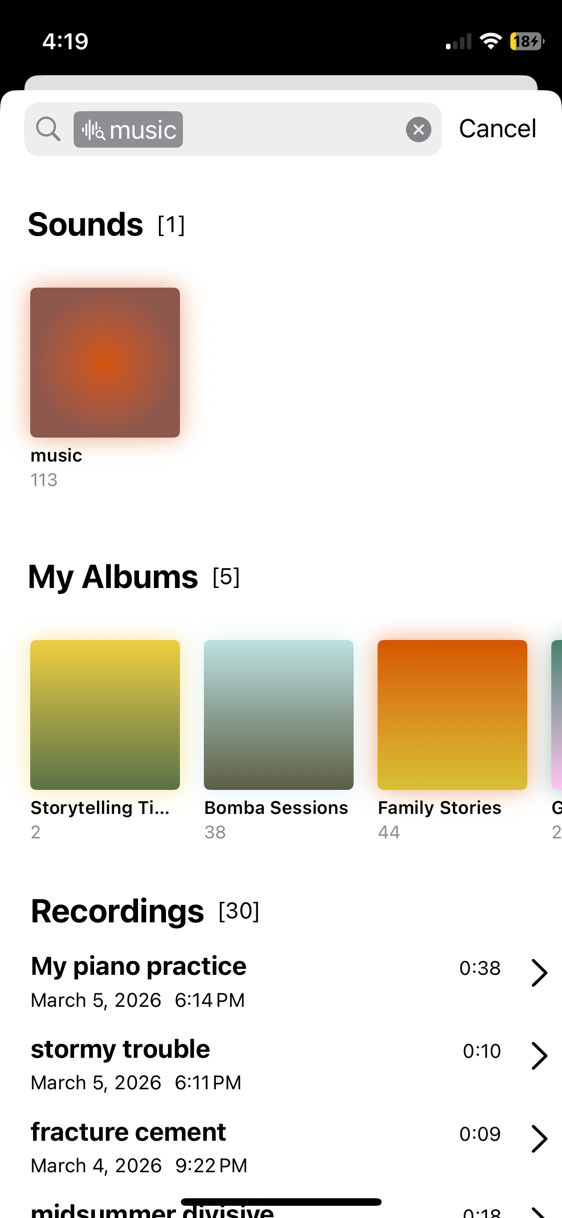
Using Apple’s own SoundAnalysis framework (the same ML that powers Sound Recognition for accessibility), Sound Library automatically categorizes every recording into 600+ sound types:
- Musical instruments: Piano, guitar, drums, saxophone, violin…
- Human sounds: Speech, singing, laughter, crying, snoring…
- Animals: Dog barking, cat meowing, birds chirping…
- Vehicles: Car engine, motorcycle, aircraft…
- Nature: Thunder, rain, wind, ocean waves…
- Domestic: Doorbell, alarm clock, dishes clanking…
And 594 more.
Real-World Examples
Scenario 1: The Musician You’re a guitarist who records riff ideas constantly. In Apple Voice Memos, they’re all “New Recording 1-99.” In Sound Library, they automatically appear in your “Guitar” sound album. No naming required.
Scenario 2: The Pet Owner Training your dog? Every session automatically groups under “Dog” sounds. Want to track progress? Just open the Dog album and sort by date.
Scenario 3: The Mechanic That weird engine noise? It’s automatically categorized under “Car Engine” along with every other engine recording you’ve made. Compare them side by side.
Scenario 4: The Parent Your kid’s first words, laughter, singing—all automatically organized. No more scrolling through hundreds of recordings to find that precious moment.
How It Actually Works
When you stop recording, Sound Library:
- Saves your audio file locally (no cloud required)
- Runs on-device ML analysis using SoundAnalysis locally
- Identifies all prominent sounds with confidence scores
- Automatically creates/updates relevant sound albums
- Makes everything searchable instantly
The entire process takes 2-3 seconds for a typical recording. No internet required. No subscription needed for this feature.
The Beautiful Part: It Works Retroactively
Import your existing Voice Memos library, and Sound Library categorizes everything automatically. Those 500 mystery recordings? They’ll finally make sense. That recording from 2019 you could never find? If it has guitar in it, it’ll be in your Guitar album.
You don’t need to remember what you named something. You don’t need perfect organization habits. You just need to remember what it sounded like.
Was it music? Check your instrument albums. Was it outdoors? Check nature sounds. Was it a meeting? It’s probably in the Speech album. The sound itself becomes the search key.
Beyond Simple Categories
Sound Library doesn’t just categorize—it creates a multi-dimensional view of your audio:
- By Sound: What type of audio it contains
- By Date: When you recorded it
- By Custom Albums: Your own organizational layer
Find recordings by answering questions like: “Show me all the guitar recordings from last December” or “What did I record at home that had laughter?”
The Bottom Line
Apple Voice Memos treats your recordings as temporary notes waiting to be named. Sound Library treats them as a searchable audio library that organizes itself.
You’ll never lose another recording to the “New Recording” abyss. Every sound has its place, automatically.